
Live process performance monitoring

The digital twin for refinery performance

Plantwin streams process historian data into multi-level dashboards for refinery, process unit, equipment, utilities and energy management — with engineer-defined KPIs, prioritised alarms and scheduled reporting.

5
Monitoring levels
1 s
Minimum sample step
P1–P4
Alarm prioritisation
100%
On-premise capable
Plantwin hexagonal brand mark

Capabilities

Built for the way a refinery is actually run

Every module reads from the same historian mapping and the same time window, so a number on the refinery dashboard is the number an engineer can trace to its tags.

Multi-level plant monitoring

Drill from refinery-wide performance to a single pump without losing context. Every level shares the same time window, units and alarm state.

  • Refinery, unit, equipment
  • Utilities and ancillary systems
  • Click-through navigation

Historian connectivity

Three transports for the same historian: the .NET bridge, the x64 ODBC driver, or a direct REST endpoint with automatic token handling.

  • Synced tag catalogue with UOM
  • Spot reads for validation
  • CSV tag import

Digital-twin KPIs you define

Every KPI is an equation over mapped tags with configurable limits, so the twin reflects your process — not a vendor's assumption about it.

  • Admin-defined equations
  • Provenance popover per card
  • Soft sensors sandbox

Consolidated alarm log

One prioritised log for KPI, equipment and utility exceedances, with frequency analytics per asset so recurring offenders surface fast.

  • P1–P4 ranking
  • Per-asset frequency history
  • Email notification rules

Energy management & ECIs

Energy intensity index, baselines with regression, Sankey energy balances and tracked Energy Conservation Initiatives with verified savings.

  • EnMS dashboard
  • Baseline regression
  • ECI savings equations

Engineering analytics

Multi-axis and stacked trends, hairline cursors with slice statistics, regression tooling and an in-browser Python notebook for ad-hoc work.

  • Saveable boards & studies
  • Hairlines with readouts
  • Pyodide notebook

Reports that arrive on time

Scheduled and on-demand reports per refinery, unit or equipment scope, delivered by email with one-click PDF and CSV export.

  • Scheduled subscriptions
  • PDF & CSV export
  • Selectable date ranges

Enterprise-ready deployment

Run in the cloud or fully on-premise behind SSL inspection, with Microsoft Entra ID SSO, role-based access and machine-bound licensing.

  • Entra ID / SAML SSO
  • Offline local auth agent
  • Signed license files

Process engineers

Unit charge rates, mass balance, conversion and yields with the analytics workbench to test a hypothesis in minutes.

Energy managers

Energy intensity, tariff-aware cost, waste heat visibility and initiative tracking against a statistical baseline.

Reliability & maintenance

Equipment health radars comparing design against actual, plus alarm frequency per asset to prioritise interventions.

Operations leadership & CTOs

One consolidated performance picture, scheduled reporting, and a deployment model that satisfies plant cyber-security policy.

Inside the twin

Control-room density, engineered for clarity

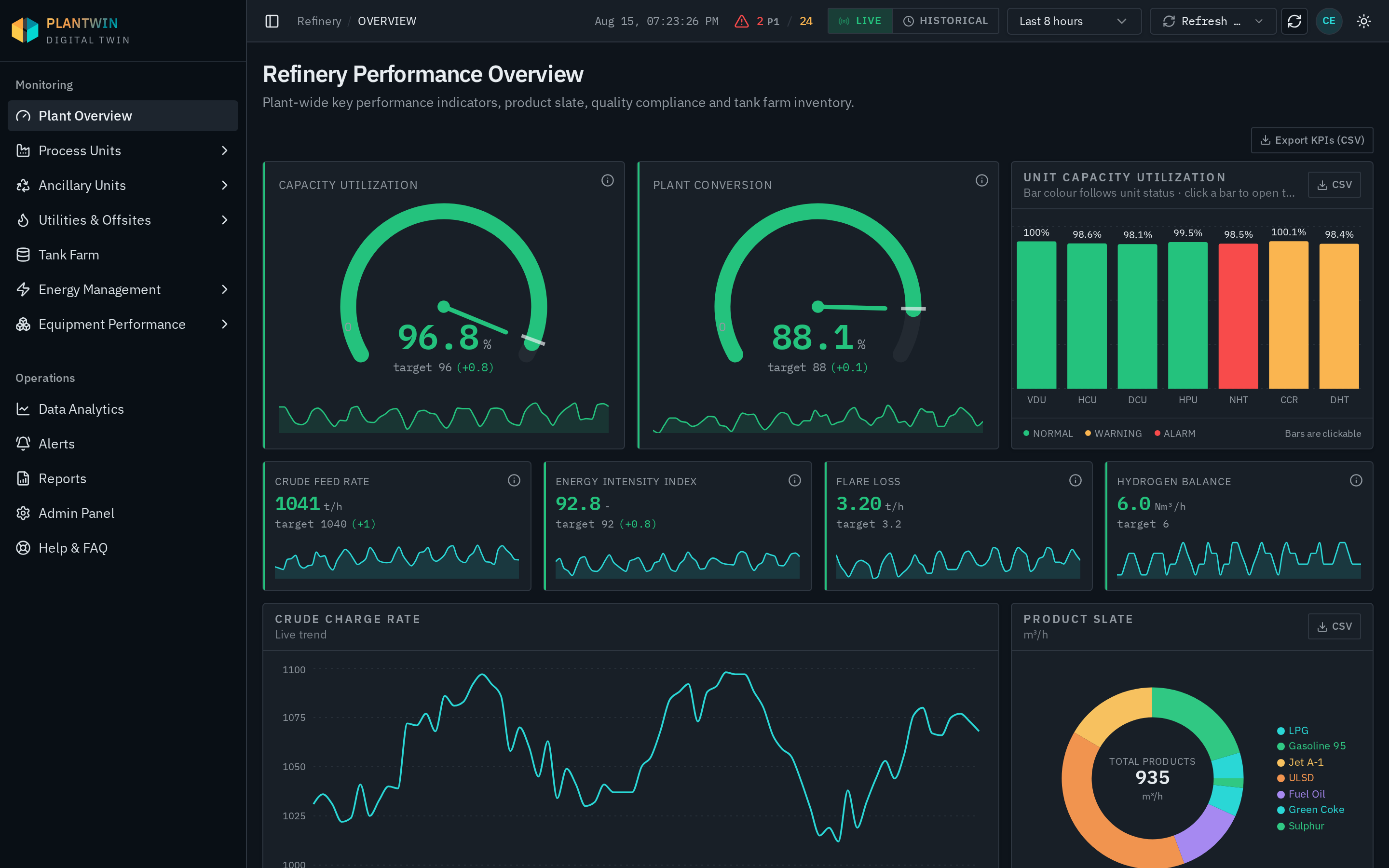
plantwin · Refinery overview
Plantwin Refinery overview dashboard

Plant-wide performance at a glance

Capacity utilisation and conversion dials with trend sparklines, per-unit utilisation bars that open the unit page, product slate and live charge rate.

Screens shown with simulated historian data. Connected installations render your own PHD tags, units and limits.

How it works

From historian to decisions in three steps

  1. 01

    Connect the historian

    Point Plantwin at PHD over the .NET bridge, ODBC or REST. The tag catalogue syncs with descriptions and engineering units.

  2. 02

    Map and model

    Register units, ancillary systems and utilities, map signals to tags, and define KPI equations with operating limits.

  3. 03

    Operate and improve

    Monitor live dashboards, act on prioritised alarms, and quantify conservation initiatives against verified baselines.

Contact

Talk to us about your plant

Tell us which units you run and how your historian is deployed. We will come back with a walkthrough tailored to your configuration — including on-premise installs behind SSL inspection.

  • Enquiries are stored in the Plantwin admin inbox — never shared with third parties.
  • An engineer replies, not a call centre. Expect a response within one business day.

By sending you agree to be contacted about Plantwin.